No DOSBox, No Glide Wrapper: Running Ignition (1997) Natively on an RTX 3080
💾 Source Code & Downloads
- 📦 GitHub Repository
- 📥 Download the patch — drop two files next to
Ign_win.exe - 📄 Reverse-engineering notes — ~3,000 lines
Ignition. UDS, 1997, published by Virgin. Top-down arcade racer, sold as Bleifuss Fun in Germany. I played the hell out of it as a kid.
The usual advice for getting it running today is “just use DOSBox.” But there is a native Win95 build — Ign_win.exe, 915,968 bytes, linked 28 August 1997 — and I wanted that one. On real hardware. On an RTX 3080.
To be clear about the target, because this is the part people assume is impossible: 64-bit Windows 11 (build 26200), no VM, no 32-bit OS, no compatibility mode, no DOSBox. The actual desktop I use every day.
It launches there just fine. And shows a black screen.
The assumption that was wrong
My first instinct was a Glide wrapper. nGlide, dgVoodoo2 — that’s the standard move for a game of this vintage, and the shipped readme.txt even name-drops 3dfx:
If you really want to use perspective corrected polygons, wait for the 3dfx patch to be released later this fall.
So I dumped the import table before touching anything:
DDRAW.dll    DirectDrawCreate
DSOUND.dll   DirectSoundCreate
DINPUT.dll   DirectInputCreateA
DPLAYX.dll   ordinal #1, #2
WINMM.dll    timeGetTime, joyGetPosEx, mciSendStringA, ...
GDI32.dll    GetDeviceCaps, GetStockObject
No Glide. No d3d8, no d3d9, no d3dim, no d3drm. There is no 3D API in this game at all.
That 3dfx patch? Never shipped, as far as I can tell. The retail Windows build renders every single pixel on the CPU.
What Ignition actually is
A hand-written x86 software rasterizer. 490 KB of .text, plus a separate PE section literally named code holding the hot inner loops — 16.16 fixed-point, the classic 1997 texel-mapper stuff.
Fun detail: that section is flagged READ|WRITE with no execute bit, and the binary has NXCOMPAT off. It works only because default Windows DEP policy is opt-in. Flip DEP to “always on” and this game dies instantly.
So the game does all its own drawing, then needs exactly one thing from the OS: put this image on the screen. DirectDraw was that one thing. And that is the only part modern Windows broke.
Which means there was never a renderer to port. Just a last inch of pipeline to replace.
Why it goes black
The game asks DirectDraw for 8-bit palettized exclusive fullscreen and a flip chain. That path is effectively dead on modern drivers — the mode-set “succeeds” and then nothing ever reaches the screen.
The fix: be DirectDraw
ddraw.dll dropped next to the EXE. Windows searches a program’s own folder before System32, and ddraw isn’t a KnownDLL, so ours wins. The game has no idea.
Recovering the API surface without Ghidra turned out to be easy: scan every call [reg+disp], group the sites by which global held the interface pointer, and match each slot set against the published DirectX vtable layouts.
0x00512C50  IDirectDraw         Release, CreateClipper, CreatePalette,
                                CreateSurface, SetCooperativeLevel, SetDisplayMode
0x0050E7A4  IDirectDrawSurface  Flip, IsLost, Restore, SetClipper, SetPalette
0x0063C614  IDirectSound        Release, CreateSoundBuffer, GetCaps, ...
21 methods across four interfaces. That’s the entire contract.
Inside, presentation goes to D3D11 — and stays 8-bit on the GPU:
- the frame uploads as an
R8_UNORMtexture (one byte per pixel) - the 256-colour palette is a separate 256×1
B8G8R8A8texture - a pixel shader does the lookup
That last bit matters. Ignition fades by reloading the palette without redrawing anything. Keeping it indexed means a fade costs a 1 KB upload instead of reconverting the whole screen.
And the key trick: we accept SetDisplayMode and change nothing. Your desktop stays at 1920×1080, and the GPU scales the game’s output. The real mode-set was the black screen.
Three bugs that ate the night
1. The silent exit. The game called GetDC on a surface. My stub returned DDERR_UNSUPPORTED and the process quit with exit code 0 — no crash, no message, no window. It looked exactly like a DLL that failed to load.
Turns out this game’s error logger is compiled out. It hits a failure, writes to a disabled logger, and calls exit(). Every failure looks identical from outside. Implementing GetDC over a DIB section fixed it.
2. Grey, then a quarter of a picture. The game calls SetDisplayMode(640, 480, 32). So I configured a 32-bit pipeline and got a greyscale mess.
Grey is a clue: if you read 8-bit palette indices as 32-bit pixels, the same byte lands in red, green and blue. The confirming screenshot had content in exactly the left 25% of the frame — 640 real bytes per 2560-byte row.
The engine asks for a 32-bit mode and then writes 8-bit indices into that stride. Fix: allocate at the requested depth, but interpret as 8-bit. Forcing the surfaces to 8bpp instead crashes the game, because that changes lPitch out from under it.
3. The crash entering a race. Not my code — an access violation inside Windows’ own winmmbase.dll. The game probes the 1997 multimedia joystick API (joyGetDevCapsA, joyGetPosEx) on the way into a race, and it faults.
First attempt: ship a replacement winmm.dll. Terrible idea — other system DLLs import from winmm too, and a stub exporting only the 8 functions this game uses breaks their imports. The process stopped starting entirely.
Right answer: hook the two IAT entries in Ign_win.exe and report “no joystick.” Nothing else in the process notices. (Install the hooks from DirectDrawCreate, never from DllMain — patching imports under the loader lock deadlocks startup.)
“Why not just use dgVoodoo2?”
Fair question, and I tried it. It works — dgVoodoo2 is a far bigger piece of engineering than this, wrapping Glide, DirectDraw and Direct3D across hundreds of games, and it deserves its reputation.
But it’s a graphics wrapper by design, so it only ever sees graphics calls. And two of Ignition’s three worst bugs aren’t graphics bugs:
- the crash entering a race is an access violation in
winmmbase.dll, from the legacy WinMM joystick API - the pinned CPU core is a
PeekMessageAspin loop in USER32
Neither call goes anywhere near DirectDraw, so no DirectDraw wrapper fixes either one. That isn’t a criticism — a general wrapper has no business hooking WinMM on the off chance some game misuses it.
That’s the real split. A general-purpose wrapper makes the game appear. Working out what the game is actually doing lets you fix what’s wrong with it. The first is more useful to more people; the second is what you need when one specific game is misbehaving in one specific way.
Yes, this runs on x64
Worth spelling out, since it trips people up.
Ign_win.exe is a 32-bit binary and always will be. It runs on 64-bit Windows through WOW64, which is not emulation — those are native x86 instructions executing on your CPU, with a thunking layer for syscalls. That part Microsoft has kept working for 25 years, and it isn’t what breaks.
What breaks is the graphics stack around it. That’s what this patch replaces.
The shim is therefore also 32-bit — it has to be, because it loads into the game’s process, and you cannot mix architectures inside one process. So ddraw.dll here is i386, built with i686-w64-mingw32-gcc, and it talks to the same 64-bit-OS D3D11 and your RTX 3080 driver that everything else on the machine uses.
No virtual machine. No Windows XP box. No 32-bit install. A 1997 game and a 2020 GPU in the same process, on a current x64 desktop.
Bonus: Windows was lying to the process
Fullscreen still came out at 640×480 in a corner. GetSystemMetrics(SM_CXSCREEN) was returning 640×480 on a 1920×1080 desktop.
The registry had compatibility shims registered for the EXE:
HKCU\Software\Microsoft\Windows NT\CurrentVersion\AppCompatFlags\Layers
  "C:\Games\IGNITION\Ign_win.exe" = "~ DWM8And16BitMitigation 640X480 WIN95"
640X480 makes Windows fake the whole desktop size. Almost certainly applied years ago while trying to make the game work. Dropped that one flag and got true borderless 1920×1080.
The part where I didn’t crack anything
Worth being precise, because people assume otherwise: Ignition has no copy protection. None.
I checked exhaustively. It imports no disc-probing APIs — no GetDriveTypeA, no GetLogicalDrives, no GetVolumeInformationA, no DeviceIoControl. Every mciSendStringA call lives in one CD-audio module. And the famous string:
"PLEASE INSERT THE IGNITION CD"
…is unreachable dead code. The function that would trigger it sets the state to 2, then calls a helper that unconditionally sets it back to 1 two instructions later. It can never render.
So nothing was bypassed, because there was nothing to bypass. Ign_win.exe is byte-for-byte the original — MD5 527bc475783319ecdd8adae1f97f6759, same as it shipped. Delete two files and you’re back to stock. The only thing a disc ever provided was redbook music.
Results
| Before | After | |
|---|---|---|
| Display | black screen | 1920×1080 borderless, GPU-scaled |
| Windowed | no | yes, resizable |
| Entering a race | crash in winmmbase.dll | fine |
| CPU | 100% of a core | ~20% |
| Game EXE | — | unmodified |
| Platform | — | 64-bit Windows 11, no VM |
The CPU one was a freebie. The main loop spins ~10⁵ iterations/sec waiting out its own 36 FPS gate, and the game never imports Sleep — not once. Hook PeekMessageA, yield when there’s no message, done.
Also worth noting: the simulation was already correct. Fixed 36 Hz accumulator, dt never enters physics, QPC-based timing. I’d braced for the usual 1997 speed disaster and it simply isn’t there. These guys knew what they were doing.
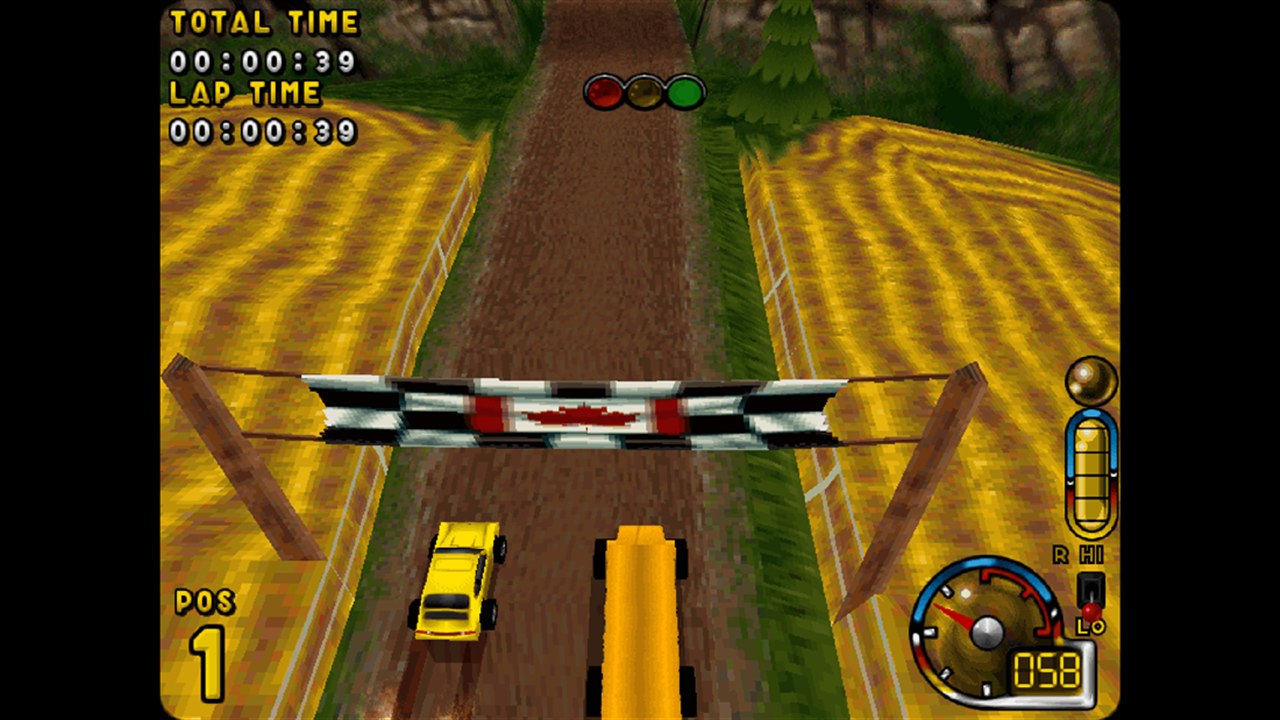
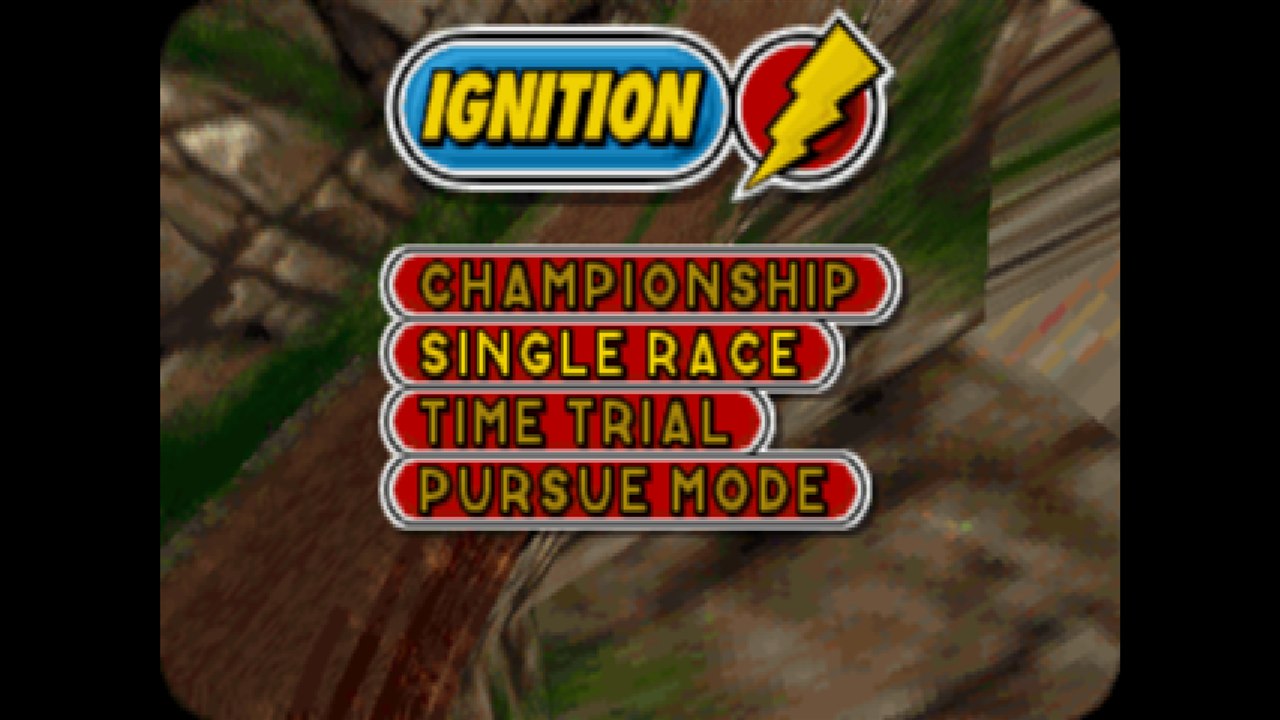
The menu is a 640×480 upscale — it’s hardcoded to that regardless of the in-game resolution setting, so the art is always stretched. Gameplay uses whatever you pick. I added a sharp-bilinear filter to stop non-integer scaling (640→1440 is 2.25×) making UI text look uneven.
How I actually did it, with Claude
The honest version: the AI’s static analysis was wrong three times, and running the real binary caught it every time.
Working in WSL, I could execute the Windows EXE directly through interop — so every hypothesis got tested on real hardware in seconds. That loop is the whole story:
- static analysis said the game never calls
GetDC. It calls it 3,252 times. - static analysis said every display mode is 8bpp. Runtime said
640x480x32, every time. - static analysis said the
codesection was self-modifying. Reading the section characteristics directly said otherwise.
No Ghidra, no radare2. capstone, objdump, and a lot of printf. About 2,000 lines of C in the end, against ~3,000 lines of notes.
The lesson isn’t “AI reverse-engineered a game.” It’s that a fast hypothesis→measure loop beats careful reading of dead bytes, and the tooling to run the actual thing is worth more than any decompiler.
Get it
Two files next to Ign_win.exe:
ddraw.dll
ign_compat.ini
That’s the install. Everything is configurable — windowed/fullscreen, scaling mode, filter, vsync:
[ignition]
WINDOWED=0
SCALING=aspect
FILTER=sharp
CPU_FIX=1
BLOCK_JOYSTICK=1
Build it yourself with 32-bit mingw-w64 and ./ign_compat/build.sh.
Obviously this ships no game data — you need your own copy of Ignition. It’s a compatibility patch, not a warez drop.
Next up, maybe: the hot rasterizer loops are only 5,527 bytes of hand-written assembly. Reverse those and the resolution ceiling goes away entirely.
Reach out on X @vaska94.